
CHEXX App and Mobile Casino in Nigeria
CHEXX does not use a native iPhone app from the Apple App Store or a native Android app from Google Play. Its mobile setup is built around the regular mobile website, a Progressive Web App (PWA) that can be installed from a supported browser, and a Telegram Mini App. That distinction matters if you are searching for a “CHEXX app” in Nigeria: the safest route is to start from the official CHEXX website rather than downloading an APK or store listing from a third party. The full picture is in our CHEXX review for Nigeria.
The PWA is the closest equivalent to a conventional casino app. It can sit on your home screen and open in an app-like window while still being installed through the browser. CHEXX currently publishes PWA installation instructions for Android, iOS, Windows and macOS. If Telegram is your preferred route, the separate CHEXX Telegram guide explains the Mini App and the difference between the gaming and support bots.
CHEXX mobile options at a glance
| Option | What it is | Best for |
|---|---|---|
| Mobile website | The standard CHEXX site opened in a phone browser | Using the platform without installing anything |
| PWA | An installable web app added from a supported browser | Home-screen access and an app-like launch experience |
| Telegram Mini App | CHEXX access inside Telegram | Users who prefer Telegram as an access channel |
| Desktop install | Browser-based install support on Windows and macOS | Quick launch from a desktop environment |
| Native App Store / Google Play app | Not part of the CHEXX setup | Do not rely on third-party listings claiming to be an official native app |
For most Nigerian users, the practical choice is between simply bookmarking the mobile website and installing the PWA. Both routes start from the official domain and keep the same account ecosystem. The Telegram Mini App is a distinct access method, not proof that a native mobile application exists.
What a PWA means in practice
A Progressive Web App is a website that can be installed through a compatible browser and launched from a home-screen or desktop icon. Unlike a traditional native app, it does not need to come from an app-store listing. That is why searching the Apple App Store or Google Play is the wrong verification method for CHEXX.
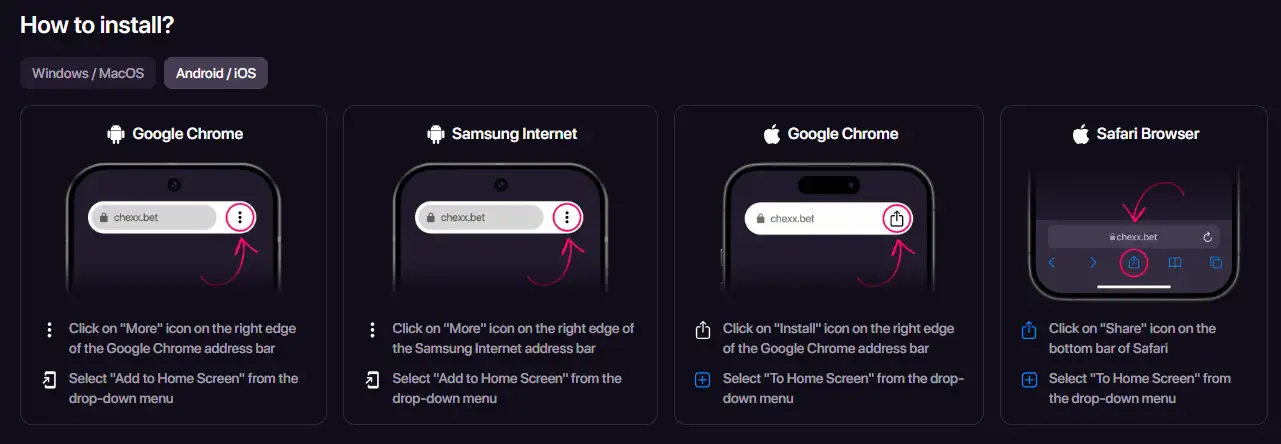
CHEXX’s current PWA page says the app is available through Google Chrome on Android, iOS, Windows and macOS, Safari on iOS and macOS, and Samsung Internet on Android. On supported devices, the browser presents an install or “Add to Home Screen” action. After installation, the icon provides direct access without requiring you to type the site address each time.
The main security benefit of this model is also simple: you can verify the official domain before installing. If a random site asks you to download a CHEXX APK, configuration profile or executable that did not originate from an official CHEXX page, that is outside the supported mobile route described here.
How to install CHEXX on Android
- Open the official CHEXX website in a supported browser such as Google Chrome or Samsung Internet.
- Use the browser menu or installation control.
- Select “Add to Home Screen” or the equivalent install option shown by the browser.
- Confirm the installation.
- Launch CHEXX from the new home-screen icon and confirm that it opens the expected official service.
CHEXX’s official PWA instructions specifically describe Chrome and Samsung Internet on Android. Because the PWA is browser-installed, there is no reason to enable installation from unknown Android sources and no reason to look for an unofficial APK.
How to install CHEXX on iPhone or iPad
On iOS, CHEXX also uses browser-based installation rather than an App Store download. The current PWA instructions include both Safari and Chrome. In Safari, the route uses the Share control followed by the home-screen option. In Chrome, the site describes an install or home-screen action when supported.
This can look less familiar than installing a native iPhone app, but the verification rule is the same: begin at the official CHEXX domain. If an App Store result, profile installer or third-party download page claims to be the required CHEXX application, do not treat that listing as official merely because it uses the brand name or logo.
Mobile casino and sportsbook access
The mobile route is not a casino-only shell. CHEXX positions the platform as both an online casino and sportsbook, and its current mobile pages expose casino and sports sections. That means the same mobile access method can be used for the broader product rather than requiring separate casino and betting apps.
For casino users, the dedicated game library covers the game catalogue and categories. Sports users can move through the mobile sportsbook from the same account environment. The key distinction is access: PWA installation changes how you launch CHEXX, not which account you use. The same CHEXX account remains behind each supported access route.
PWA versus simply using the browser
You do not have to install the PWA to use CHEXX on a phone. The normal mobile website remains the simplest route if you prefer not to add another icon to your device. A PWA is mainly about convenience: a dedicated shortcut, faster return to the site and a more app-like launch experience.
The browser-only route can be preferable on a shared device because it leaves fewer persistent launch points. A PWA can be preferable on a personal phone where you want one-tap access. Neither choice changes the need to protect your account credentials and keep control of the device.
Notifications and device permissions
CHEXX presents device notifications as one of the PWA benefits. Treat notification permissions as optional rather than automatic. If you do not want betting or casino alerts appearing on a lock screen, decline notifications or disable them in your device settings.
This is particularly relevant on shared or family devices. A home-screen icon and push notification can reveal gambling activity even when the account itself is password protected. Privacy is therefore part of the installation decision, not only a question of technical compatibility.
What about Windows and macOS?
CHEXX’s current PWA instructions also cover desktop installation. Chrome is listed for Windows and macOS, while Safari on macOS can add the site to the Dock. This means “downloadable application” in the CHEXX setup should be understood through its browser-install model rather than assumed to mean a separately distributed native desktop program.
If you switch between desktop and mobile, the practical advantage is consistency: you are reaching the same service through different launch methods. Before installing on either platform, verify that the browser is displaying the official CHEXX domain.
Telegram is a separate access channel
CHEXX also uses Telegram Mini Apps. This route lets a user access the service inside Telegram and is distinct from the PWA. CHEXX identifies @ChexxBetBot as the gaming bot and @ChexxSupportBot as the support bot. These roles should not be mixed up.
If you intend to use Telegram, verify the handle character by character before interacting with a bot. Impersonation is easier when users search by display name alone. The full Telegram Mini App and bots guide explains the two handles and the support route without duplicating the entire mobile comparison here.
Language on mobile
CHEXX lists its UI and help-centre languages as English, Spanish and Portuguese. For Nigeria, English is the practical interface choice. The mobile access method does not create a separate Nigerian-language build or a different app-store edition.
If you change device language or install the PWA from a browser using another language, still verify the domain and account before entering credentials. Interface language is a convenience setting, not a security signal.
Safe installation checklist
- Start from the official CHEXX website.
- Use the browser’s built-in install or “Add to Home Screen” function.
- Do not enable unknown-source APK installation for CHEXX.
- Do not assume a store listing is official because it uses the CHEXX name or artwork.
- Check the domain again after installation and before entering account credentials.
- Review notification permissions, especially on shared devices.
- Use the official Telegram handles if you choose the Telegram route.
- Keep registration and account recovery inside official CHEXX channels.
If you have not created an account yet, see registration for the supported sign-up routes, authentication options and basic account setup details used by CHEXX.
The best way to use CHEXX on mobile
There is a CHEXX app-like mobile experience, but it is not a native App Store or Google Play application. The supported model is the mobile website plus a browser-installed PWA, with Telegram Mini App access as an additional route. CHEXX currently provides PWA installation instructions for major mobile and desktop browsers. The bot route is covered separately: CHEXX on Telegram.
For Nigerian users, the safest approach is to treat the official website as the starting point. Install through the browser, avoid third-party APKs and verify Telegram handles before use. If you want the fastest no-install option, use the mobile website. If you want a persistent home-screen shortcut, use the PWA. For Telegram-specific access, continue to the CHEXX Telegram bot guide, or return to the main CHEXX Nigeria review for the wider platform assessment.